

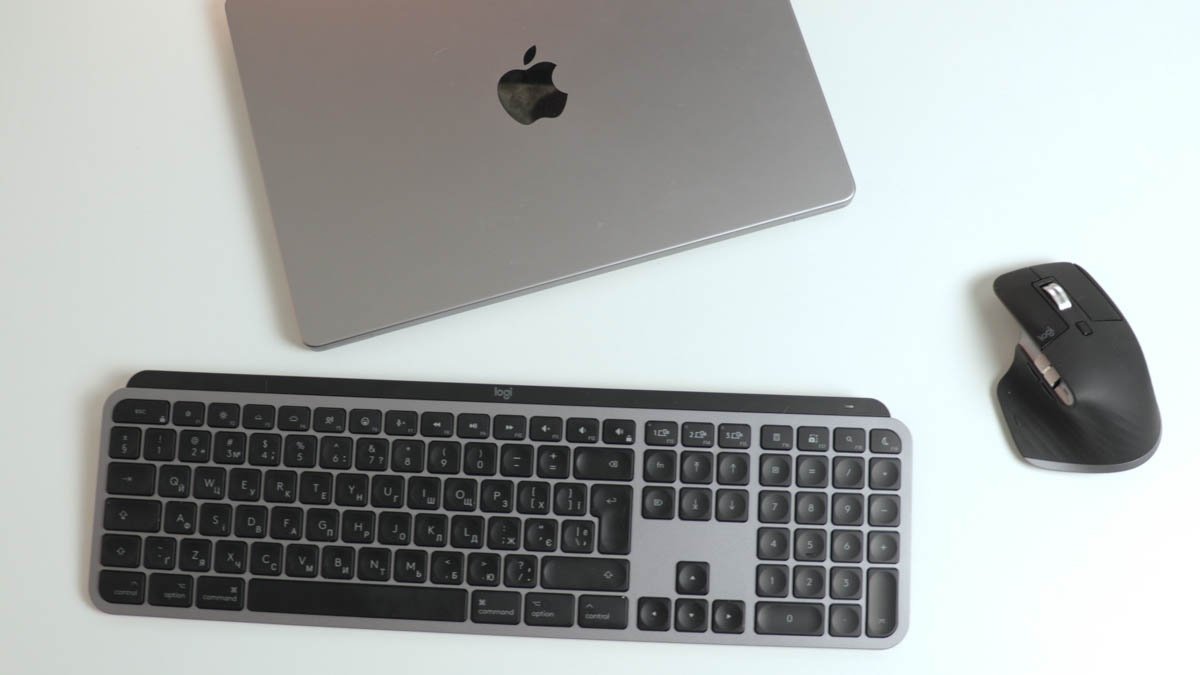
For years, the default recommendation for anyone setting up an Apple desktop or docking a MacBook has been simple: buy the Apple Magic Keyboard and the Magic Mouse. They offer unparalleled integration, a slim footprint, and immediate aesthetic cohesion.
However, Logitech’s dedicated “For Mac” ecosystem—spearheaded by the MX Keys Mini for Mac and the newly released MX Master 4 for Mac—makes a compelling case to ditch the default options. Optimized explicitly for macOS, this high-end duo trades Apple’s sleek flatness for robust ergonomics and deeply customizable software.
The Price and Competitor Matrix
While Apple sets a premium baseline, Logitech enters the fray at a similar (and in the mouse’s case, significantly higher) price point. However, retail discounts on Logitech hardware are frequent.
| Peripheral | Apple Magic Ecosystem | Logitech ‘For Mac’ Alternative | Key Structural Difference |
| Keyboard |
Magic Keyboard (USB-C): ₹9,500 Magic Keyboard (Touch ID): ₹14,500 |
MX Keys Mini for Mac: ₹9,295 |
Apple: Shallow travel, lightning-quick. Logitech: Deeper travel, concave key dishes, robust weight. |
| Mouse | Magic Mouse (USB-C): ₹9,500 | MX Master 4 for Mac: ₹12,995 |
Apple: Low-profile, capacitive multi-touch surface. Logitech: Ergonomic high-arch, thumb rests, physical wheels, haptic engine. |
Keyboard Confrontation: MX Keys Mini vs. Magic Keyboard
The Logitech MX Keys Mini for Mac changes the structural and tactile approach to Mac typing.
-
The Typing Experience: Apple uses a very shallow key travel that favors sharp, rapid, and clicky keystrokes. Logitech implements a scissor-actuated membrane with noticeably deeper, softer travel. Each keycaps features a pronounced spherical indentation that naturally guides fingers to the center of the switch, preventing mistypes.
-
Premium Architecture: Weighing significantly more than its Apple counterpart, the MX Keys Mini is carved from high-quality aluminum with zero structural flex. It features a built-in riser bar on the underside to tilt the deck at a comfortable typing angle.
-
The Command Key Quirk: While the keyboard maps out exact Mac-specific function rows (Control, Option, Command), the physical Command key is slightly smaller than what native Mac users are accustomed to on standard Apple keyboards.
-
Battery Life: Logitech claims anywhere from 10 days (with backlighting fully on) to 5 months (backlighting off). In real-world testing (10 hours of daily use over 5 days with backlighting disabled), the battery drained just 1%—from 100% to 99%.
Mouse Melee: MX Master 4 vs. Magic Mouse
The MX Master 4 for Mac represents a massive paradigm shift from Apple’s touch-based pointer strategy.
-
Ergonomics and Weight: Unlike the completely flat Magic Mouse, the MX Master 4 features a high-rising, heavily contoured ergonomic wave shape that supports the entire hand. Be aware: it is noticeably heavier than the previous MX Master 3s, which may cause hand fatigue for users who prefer featherweight mice.
-
Premium Materials: This generation swaps out several of the aging silicone inserts from older models for durable, matte-finished plastics that retain a premium feel without degrading over time.
-
The “For Mac” Connectivity Catch: The “For Mac” variant is strictly Bluetooth-only and does not include the Logi Bolt USB receiver found in the standard Windows/Cross-Platform box. It does, however, feature an upgraded wireless radio chip for incredibly stable multi-device switching.
-
Built-in Haptics and Gestures: The headline addition is a brand-new haptic engine that provides physical feedback, mimicking the click feel of an Apple Trackpad. The integrated thumb pad supports customizable macOS gestures, though it still lacks the addictive, seamless multi-touch scrolling surface of Apple’s Magic Mouse.
-
Note: This mouse remains strictly designed for right-handed users; a left-handed variant does not exist.
The Software Superpower: Logi Options+
The true reason to choose Logitech over Apple is the Logi Options+ desktop software, which turns static peripherals into hyper-automated productivity tools:
-
Total Key Remapping: Every single button on the MX Master 4 and the function row of the MX Keys Mini can be fully remapped on a per-app basis.
-
Logi Flow: This allows you to move your cursor past the edge of one Mac screen directly onto a secondary computer (even a Windows PC) over the local network. It enables seamless copy-and-pasting of text, full images, and documents across entirely separate machines.
-
The Miss: Flow currently lacks support for iPadOS or Android tablets, which frequently serve as secondary screens for modern creative workflows.
-
The Final Verdict
-
Stick with the Apple Magic Bundle if: You absolutely require biometric security (Touch ID), prefer an ultra-portable low-profile setup, or are deeply addicted to the physical multi-touch swiping gestures built into the top surface of the Magic Mouse.
-
Switch to the Logitech MX Duo if: You prioritize long-term wrist ergonomics, want deeper key travel, frequently jump between multiple computers using Logi Flow, and want to deeply map out custom application shortcuts and automated macro triggers via software.
